Articles in this section
What is Labor Allocation?
What is Labor Allocation?
Track exactly where employee hours go: by job, department, cost center, or task.
Labor Allocation is a TimeTrakGO feature that lets employees assign their time to specific jobs, departments, cost centers, or tasks while they work. Instead of tracking only that an employee worked 8 hours, you know exactly where those 8 hours went.
That distinction matters when you're running jobs across multiple sites, tracking labor costs by department, or trying to understand how time is split between different areas of your operation.
How It Works
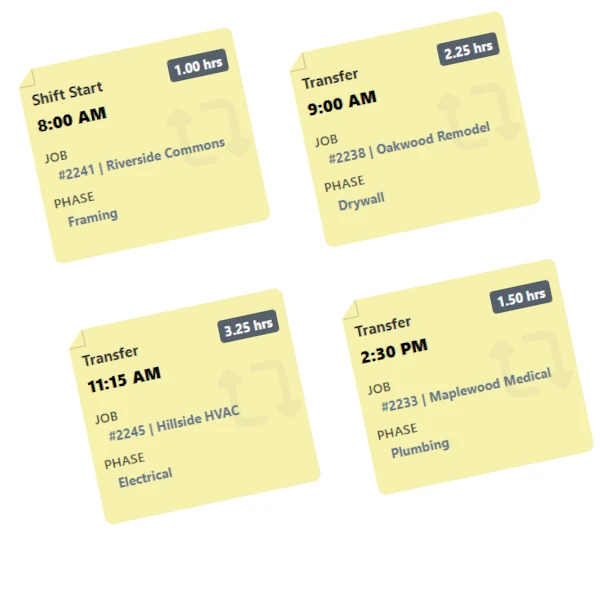
When Labor Allocation is enabled, employees select a labor category when they clock in. If their work changes throughout the day, they can use the transfer button to switch to a different category without clocking out. TimeTrakGO tracks the time spent in each category automatically.
Employees can transfer between categories up to four times in a single shift, giving you a detailed breakdown of how their hours were actually spent.
What Are Labor Categories?
Labor categories are custom defined. You choose the names, you choose what they represent, and you build them to match the way your business actually operates.
You can create up to four category types per account, each with its own name and list of options.
Who Is Labor Allocation For?
Labor Allocation is a good fit for any business that needs to know more than just total hours worked. Common use cases include:
If your payroll, job costing, or reporting depends on knowing where time was actually spent, Labor Allocation gives you that data at the source.
What Labor Allocation Is Not
Labor Allocation tracks how time is distributed across categories. It does not replace your payroll system, project management tool, or accounting software. It gives you accurate, employee-reported time data that you can use to feed those systems.